Google Glass. Layer
Enhance your reality with Google Glass thanks to the Layer

Google Glass is Google on your face
Google Glass is a wearable computer with an optical head-mounted display (OHMD). It was developed by Google with the mission of producing a mass-market ubiquitous computer. Google Glass displays information in a smartphone-like hands-free format. Wearers communicate with the Internet via natural language voice commands.
Google provides four prescription frame choice for about $225.00 U.S. It is necessary to remove a small screw in order to move the Google Glass from one frame to another.
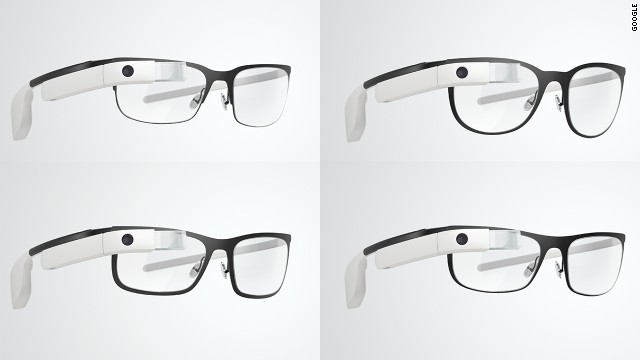
Features
- Touchpad: A touchpad is located on the side of Google Glass, allowing users to control the device by swiping through a timeline-like interface displayed on the screen. Sliding backward shows current events, such as weather, and sliding forward shows past events, such as phone calls, photos, circle updates, etc.

- Other than the touchpad, Google Glass can be controlled using "voice actions". To activate Glass, wearers tilt their heads 30° upward (which can be altered for preference) or tap the touchpad, and say "O.K., Glass." Once Glass is activated, wearers can say an action, such as "Take a picture", "Record a video", "Hangout with [person/Google+ circle]", "Google 'What year was Wikipedia founded?'", "Give me directions to the Eiffel Tower", and "Send a message to John". For search results that are read back to the user, the voice response is relayed using bone conduction through a transducer that sits beside the ear, thereby rendering the sound almost inaudible to other people.

- Camera: Google Glass has the ability to take photos and record 720p HD video. While video is recording, the screen stays on while it is doing so.
- Display: The Explorer version of Google Glass uses a Liquid Crystal on Silicon (LCoS), field-sequential color, LED illuminated display. The display's LED illumination is first P-polarized and then shines through the in-coupling polarizing beam splitter (PBS) to the LCoS panel. The panel reflects the light and alters it to S-polarization at active pixel sites. The in-coupling PBS then reflects the S-polarized areas of light at 45° through the out-coupling beam splitter to a collimating reflector at the other end. Finally, the out-coupling beam splitter (which is a partially reflecting mirror, not a polarizing beam splitter) reflects the collimated light another 45° and into the wearer's eye.
Apps
Google Glass applications are free applications built by third-party developers. Glass also uses many existing Google applications, such as Google Now, Google Maps, Google+, and Gmail.
Third-party applications announced at South by Southwest (SXSW) include Evernote, Skitch, The New York Times, and Path.
On April 15, 2013, Google released the Mirror API, allowing developers to start making apps for Glass. In the terms of service, it is stated that developers may not put ads in their apps or charge fees; a Google representative told The Verge that this might change in the future.
Many developers and companies have built applications for Glass, including news apps, facial recognition, exercise, photo manipulation, translation, and sharing to social networks, such as Facebook and Twitter.
On May 16, 2013, Google announced the release of seven new apps, including reminders from Evernote, fashion news from Elle, and news alerts from CNN. Following Google's XE7 Glass Explorer Edition update in early July 2013, evidence of a "Glass Boutique", a store that will allow synchronization to Glass of Glassware and APKs, was noted.
Version XE8 made a debut for Google Glass on August 12, 2013. It brings an integrated video player with playback controls, the ability to post an update to Path, and lets users save notes to Evernote. Several other minute improvements include volume controls, improved voice recognition, and several new Google Now cards.
On November 19, 2013, Google unveiled its Glass Development Kit, showcasing a translation app Word Lens, a cooking app AllTheCooks, and an exercise app Strava among others as successful examples.
So, this is what Google Glass actually does:
takes photos and videos, sends text messages, engages in FaceTime-like Google Hangouts, makes phone calls, searches Google, and gets turn-by-turn navigation with maps. It can show the weather, the time, and headlines from The New York Times that have been pushed to the device, with spoken headline summaries. For now, anyway, that's about it. Some features require tethering - GPS-based functions that use the phone, such as turn-by-turn directions. Others, like Google Hangouts and Google Search, can also be performed over Wi-Fi. When offline, Glass only takes photos and videos.
Let's move on to the Augmented Reality in Google Glass
Layer brings its Augmented Reality to Google Glass

Augmented reality and wearable technology go hand-in-hand, so it’s with not too much surprise that we’ve just learnt that Layar‘s augmented reality app is now available to download for Google Glass.
Layar, one of the first companies to bring augmented reality to mobile browsers, is now on Google Glass. The beta app scans print content, geo-layer, QR codes and even movie posters to provide information, videos and websites.
Google Glass got an unofficial augmented reality app on Thursday, March 17th, as Layar introduced its immersive platform to the wearable device. The beta software has to be downloaded directly from Layar’s website and installed manually to Glass. Once that’s done, however, you can simply say “OK Glass, scan this” to see information from print magazines, local real estate or even movie trailers.

Nonetheless, this is only a beta launch, so we can expect new features and future refinements based on user feedback in later iterations of the app. Layar isn’t alone either. UK-based AR company Blippar showed off the first live demo of its Google Glass app at MWC this year.
Sources:
http://www.google.com/glass/help/frames/
http://en.wikipedia.org/wiki/Google_Glass
http://www.techradar.com/reviews/gadgets/google-glass-1152283/review#articleContent
http://www.cnet.com/products/google-glass/
http://www.engadget.com/2014/03/20/layar-google-glass-app/
http://gigaom.com/2014/03/20/layar-brings-augmented-reality-and-a-qr-code-scanner-to-google-glass/
http://thenextweb.com/apps/2014/03/19/layar-now-wants-augment-reality-google-glass-app/

No comments:
Post a Comment