Monday, May 26, 2014

CAJ Augmented Reality Companies That Use Epson BT-200 Smart Glasses Platform SUK4 Part1 Part2 Hendrik Henry

Augmented Reality Companies That Use Epson BT-200 Smart Glasses Platform

Moverio Epson BT-200 Smart Glasses gained such an enormous popularity, that their platform is used by the greatest augmented reality companies to provide hands-free and easy solutions in industries and everyday life.
 
APX Labs

 
 APX Labs is a privately-held software company pursuing the design and creation of the premier enterprise smart glasses platform. The Moverio BT-200’s front-facing camera and motion sensors are two key features that have made the Epson Moverio BT-200 a core component of APX Labs’ enterprise-level Skylight platform. We will talk about Skylight in the next post, since this is what actually brings augmented reality to appliances.

 
Scope AR

Scope AR is an augmented reality solutions company that provides the world’s most advanced augmented reality Training Solutions. They are leading the way in this emerging market, using the latest in augmented glasses and software to provide an incredible real-time 3D overlay training solution. Scope AR is using the Epson BT-200 in their advanced training technology by overlaying instructions and pertinent reference material directly on the system to allow hands-free training.

Scope AR brings massive benefits to the client.
  • 100% consistency of best practice instruction.
  • Significant cost benefits in reducing shut-down time on industrial equipment.
  • Assurances of improved maintenance due to proper training, resulting in significant reduction of lost revenue
  • Automated Tracking System allows database verification of who is trained, when and to what level.
  • Safety First” instruction ensures absolute awareness of incident risk.
  • First hand veteran experience integrated on set-up, freeing senior staff from basic training duties.
  • Completely updateable to allow for shifts in best practices.
  • In-built camera allows for targeted or universal recording for procedure logging and best practice verification.

Evena MedicalEvena Eyes-On™ Glasses

The newest addition to the Evena family of products is the one-of-a-kind point-of-care wearable Eyes-On™ Glasses system. Evena Eyes-On Glasses provide all the same imaging technology advantages as other Evena products, but in a cost-effective, cart-free, wearable form. The Evena Glasses system is appropriate for pre-hospital, physician offices, clinics or hospitals. The Glasses unit is battery powered and offers the ultimate in portability and ease of use.
Unique Eyes-on Glasses features include:
  • Multi-Spectral Imaging - a breakthrough patented technology developed by Evena for the deepest penetration with the most detailed and sharpest image is effective for almost all physiologies.
  • Real-time anatomically accurate images – no other system provides such exceptionally clear, accurate images.
  • EMR/PACS interface enables automated, improved and more precise documentation of appropriate care.
  • Hands-free, cart-free, wearable technology allows medical staff to maneuver anywhere anytime with the complete vasculature image right before their eyes.
  • See-through, Eyes-On technology allows the user to have full situational awareness, to keep eye contact with the patient plus a clear view of the patient’s area of interest, enabling quick and easy location and access to the best vein.
So, in hands of such powerful companies Augmented Reality is confidently penetrating and making our reality better and easier to handle.

 
Sources:


Tuesday, May 20, 2014

Abstract SUK4 Part2 Henry

WHEN ZOMBIES ATTACK!:!

MATHEMATICAL MODELLING OF AN OUTBREAK OF
ZOMBIE INFECTION! !


Humanity is desperately trying to fight against zombies in science fiction novels and films nowadays. Therefore, it is the purpose of this paper to model mathematically the outcome of a zombie outbreak in the real world. The models are established on the basis of the popular-culture zombie with the timescale of the outbreak being short, so that the natural birth and death rates could be ignored. The interaction between zombies and humans in the mathematical models is calculated with the help of Euler’s method for solving ordinary differential equations. According to the Basic Model, the Model with Latent Infection and the Model with Quarantine, humans will be eradicated completely, but in the case of the last two models it will take a little longer. It has been found out that the Model with Treatment is the only one giving low numbers of humans a chance to remain humans or to be treated once they are infected; still, the cure does not provide immunity and the human will again become susceptible. The results show that in case of a zombie outbreak luck is not on the humans’ side, unless an effective destructive strategy is immediately employed against the walking dead. Otherwise, the invasion of zombies will lead to the collapse of the civilisation, as large numbers of people will be either zombified or dead.

[217]

Friday, May 16, 2014

Instruction How to Kill Hitler SUK4 Part1 Hendrik

How to Kill Hitler Immediately After His Birth

Adolf Hitler is considered to be one of the worst nightmares of the 20th century. Not surprisingly, there were over 40 documented attempts on his life. Taking into account all the unsuccessful assassination attempts on his life in 1930s and 1940s, this instruction shows how to kill Hitler in his childhood. If you are not ready to kill a child, follow the instruction on the next page. Be aware that you might have to dedicate your whole life to carry out this assassination.
1.    Build a super powerful, super-fast and super noiseless time machine.  If you are not a specialist in this field, find the necessary engineers to do that. If you fail to construct a time machine or any other means to travel in time, then you cannot kill Adolf Hitler.
2.    Once you have got a time machine, you need to invent a potion that would make you invisible. Invisibility would increase your chances of the successful completion of the task.  If you do not have the invisibility potion, find a nurse’s uniform (see picture 1).
3.    Find a quick-acting poison or any other means to kill Hitler with.
4.    Drink an invisibility potion (if you have got one) or put on a nurse’s uniform and travel to April, the 20th 1889 to Gasthof zum Pommer’s maternity hospital. Find Klara Hitler (see picture 2) who is about to give birth to Adolf. As soon as the child is born, follow him to the infant incubator and poison him.
5.    Make sure that the child is dead.
6.    Go back to your time.
Note! When you come back to your time, you might find a completely different world there. Don’t worry. By killing Hitler you have changed the course of history.
           
              Picture 1                              Picture 2

Sunday, May 11, 2014

CAJ Moverio BT-200 Augmented Reality Smart Glasses SUK4 Part1 Part2 Hendrik Henry

Moverio BT-200 Augmented Realitity Smart Glasses

Is Epson Challenging Google Glass or not?


It may be best known for printers, but Epson has also been working to break into the wearable technology market recently. To that end, it just unveiled the second-generation Epson Moverio BT-200 augmented reality smart glasses at CES in Vegas. These Android-powered smart glasses feature a transparent display, head motion tracking, and a built-in camera.
Moverio_BT-200_Smart_Glasses_01

Now the first thing we need to get straight is this is NOT a Google Glass competitor. This isn’t a product that you will wear while you are driving, grocery shopping, or any other like activity. This is meant for your personal time, when you can kick back and play an augmented reality game or watch a movie. It can also be used for certain business applications.

The original Epson Moverio BT-100 glasses have been on sale for around a year and, at $700 per pair, it wouldn’t be too unkind to say they haven’t made a major splash. Epson is aiming to change that with a raft of improvements in the second generation Moverio BT-200 glasses, which will land at exactly the same price point of $700.

The Moverio BT-200 glasses are 60 percent lighter and significantly smaller than their predecessors. They feature a binocular display using an LCD-based projection lens system, which enables them to overlay digital content onto the real world in the center of your field of view. You can use them to watch video content or play augmented reality games, but Epson is also touting enterprise uses, such as guidance for engineers or medical professionals.

The display has a 960 x 540 pixel resolution, which is the same as the BT-100 glasses. Inside there’s a gyroscope, accelerometer, and a magnetic compass to support head-motion tracking and hands-free navigation. The front-facing camera can capture photos and videos. Built in Wi-Fi allows for video streaming, there’s HDMI connectivity as an option, and wireless mirroring enables you to stream to a big screen. You’ll also find Bluetooth 3.0 support, a microSDHC card slot, which can take cards up to 32GB in size, and Dolby Digital Plus sound. It also has Miracast built in so you can mirror what you see in your glasses, plus it will also accept video from other Miracast devices. That’s important because you could mirror videos or pictures from your smartphone to the Moverio.

Unfortunately, instead of hooking up to your smartphone, there’s a handheld controller unit with a touchpad, which runs Android 4.0. This has to be tethered to the glasses via a cord, which seems like an obvious drawback.

The key to the Moverio is the development community, and Epson has attracted some key players. They had about 5 or 6 of them onsite at their CES booth. A couple of notables were Metaio, one of the leaders in augmented reality, and Sean McCracken, who developed a game called Psyclops for Google Glass (now ported to the Moverio). He also has another game called Sky Temple in the works, which looks fantastic. Both of his games are gyro-based and you really feel as if you are right in the middle of the game. Think Oculus Rift without all the bulk. In talking with Sean, he agreed that the Moverio is more suited for gaming than Google Glass because of the larger visual display and the controller.

The Epson Moverio BT-200 glasses went on sale in March.


Sources:

http://www.digitaltrends.com/mobile/epson-shows-next-gen-augmented-reality-smart-glasses/#!E2Qsk

http://www.talkandroid.com/191693-hands-on-with-the-epson-moverio-bt-200-augmented-reality-smart-glasses-at-ces-2014/


Friday, May 2, 2014

CAJ Google Glass SUK4 Part1 Part2 Hendrik Henry

Google Glass. Layer

Enhance your reality with Google Glass thanks to the Layer

Google Glass is Google on your face
Google Glass is a wearable computer with an optical head-mounted display (OHMD). It was developed by Google with the mission of producing a mass-market ubiquitous computer. Google Glass displays information in a smartphone-like hands-free format. Wearers communicate with the Internet via natural language voice commands.

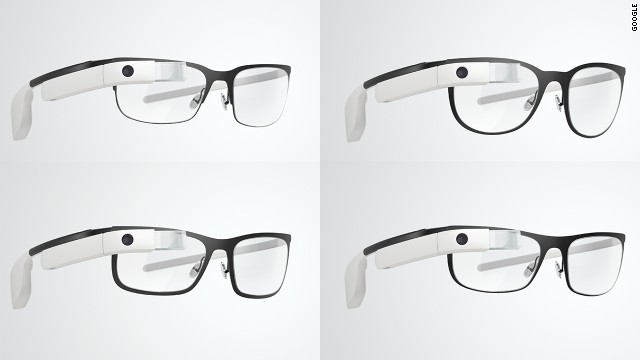
Google provides four prescription frame choice for about $225.00 U.S. It is necessary to remove a small screw in order to move the Google Glass from one frame to another.
Features
  • Touchpad: A touchpad is located on the side of Google Glass, allowing users to control the device by swiping through a timeline-like interface displayed on the screen. Sliding backward shows current events, such as weather, and sliding forward shows past events, such as phone calls, photos, circle updates, etc.
  • Other than the touchpad, Google Glass can be controlled using "voice actions". To activate Glass, wearers tilt their heads 30° upward (which can be altered for preference) or tap the touchpad, and say "O.K., Glass." Once Glass is activated, wearers can say an action, such as "Take a picture", "Record a video", "Hangout with [person/Google+ circle]", "Google 'What year was Wikipedia founded?'", "Give me directions to the Eiffel Tower", and "Send a message to John". For search results that are read back to the user, the voice response is relayed using bone conduction through a transducer that sits beside the ear, thereby rendering the sound almost inaudible to other people.
What does wearing Google Glass look like
  • Camera: Google Glass has the ability to take photos and record 720p HD video. While video is recording, the screen stays on while it is doing so.
  • Display: The Explorer version of Google Glass uses a Liquid Crystal on Silicon (LCoS), field-sequential color, LED illuminated display. The display's LED illumination is first P-polarized and then shines through the in-coupling polarizing beam splitter (PBS) to the LCoS panel. The panel reflects the light and alters it to S-polarization at active pixel sites. The in-coupling PBS then reflects the S-polarized areas of light at 45° through the out-coupling beam splitter to a collimating reflector at the other end. Finally, the out-coupling beam splitter (which is a partially reflecting mirror, not a polarizing beam splitter) reflects the collimated light another 45° and into the wearer's eye.
Apps
Google Glass applications are free applications built by third-party developers. Glass also uses many existing Google applications, such as Google NowGoogle MapsGoogle+, and Gmail.
Third-party applications announced at South by Southwest (SXSW) include EvernoteSkitchThe New York Times, and Path.
On April 15, 2013, Google released the Mirror API, allowing developers to start making apps for Glass. In the terms of service, it is stated that developers may not put ads in their apps or charge fees; a Google representative told The Verge that this might change in the future.
Many developers and companies have built applications for Glass, including news apps, facial recognition, exercise, photo manipulation, translation, and sharing to social networks, such as Facebook and Twitter.
On May 16, 2013, Google announced the release of seven new apps, including reminders from Evernote, fashion news from Elle, and news alerts from CNN. Following Google's XE7 Glass Explorer Edition update in early July 2013, evidence of a "Glass Boutique", a store that will allow synchronization to Glass of Glassware and APKs, was noted.
Version XE8 made a debut for Google Glass on August 12, 2013. It brings an integrated video player with playback controls, the ability to post an update to Path, and lets users save notes to Evernote. Several other minute improvements include volume controls, improved voice recognition, and several new Google Now cards.
On November 19, 2013, Google unveiled its Glass Development Kit, showcasing a translation app Word Lens, a cooking app AllTheCooks, and an exercise app Strava among others as successful examples.

So, this is what Google Glass actually does:
takes photos and videos, sends text messages, engages in FaceTime-like Google Hangouts, makes phone calls, searches Google, and gets turn-by-turn navigation with maps. It can show the weather, the time, and headlines from The New York Times that have been pushed to the device, with spoken headline summaries. For now, anyway, that's about it. Some features require tethering - GPS-based functions that use the phone, such as turn-by-turn directions. Others, like Google Hangouts and Google Search, can also be performed over Wi-Fi. When offline, Glass only takes photos and videos.


Let's move on to the Augmented Reality in Google Glass
Layer brings its Augmented Reality to Google Glass
Augmented reality and wearable technology go hand-in-hand, so it’s with not too much surprise that we’ve just learnt that Layar‘s augmented reality app is now available to download for Google Glass.
Layar, one of the first companies to bring augmented reality to mobile browsers, is now on Google Glass. The beta app scans print content, geo-layer, QR codes and even movie posters to provide information, videos and websites.
Google Glass got an unofficial augmented reality app on Thursday, March 17th, as Layar introduced its immersive platform to the wearable device. The beta software has to be downloaded directly from Layar’s website and installed manually to Glass. Once that’s done, however, you can simply say “OK Glass, scan this” to see information from print magazines, local real estate or even movie trailers.
Glass Layar2 730x410 Layar now wants to augment your reality with its Google Glass app
Nonetheless, this is only a beta launch, so we can expect new features and future refinements based on user feedback in later iterations of the app. Layar isn’t alone either. UK-based AR company Blippar showed off the first live demo of its Google Glass app at MWC this year.


Sources:
http://www.google.com/glass/help/frames/
http://en.wikipedia.org/wiki/Google_Glass
http://www.techradar.com/reviews/gadgets/google-glass-1152283/review#articleContent
http://www.cnet.com/products/google-glass/
http://www.engadget.com/2014/03/20/layar-google-glass-app/
http://gigaom.com/2014/03/20/layar-brings-augmented-reality-and-a-qr-code-scanner-to-google-glass/
http://thenextweb.com/apps/2014/03/19/layar-now-wants-augment-reality-google-glass-app/